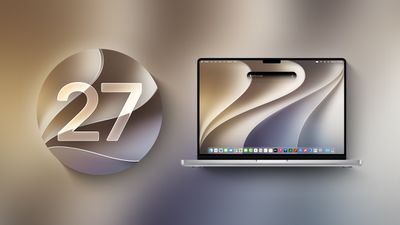
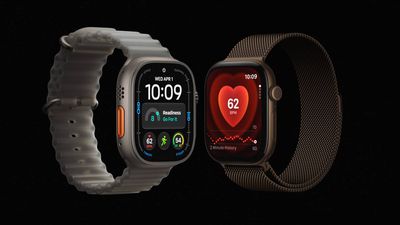
Ever since the Apple Watch Series 4 in 2018, the larger-sized aluminum Apple Watch has started at $429 in the U.S., but that has changed with the Apple Watch Series 12.
While the Apple Watch Series 12 with a 42mm case maintains a starting price of $399, the 46mm model has received a $20 price increase and now starts at $449.
In other words, stepping up to a 46mm case now costs an extra $50 instead of $30.
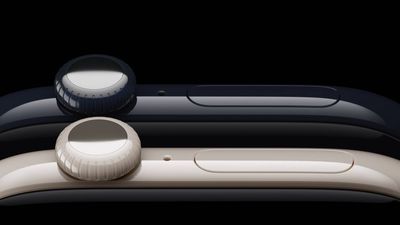
Apple Watch Series 12 models with a ceramic case are physically larger than the same model in aluminum or titanium, according to Apple's own tech specs.
At 46mm, Apple's tech specs page lists the aluminum and titanium case at 46mm by 40mm by 9.7mm, while the ceramic case sold under the same 46mm name measures 47mm by 41mm by 9.85mm, a millimeter taller, a millimeter wider, and 0.15mm thicker. The 42mm size follows the same pattern: 42mm by 37mm by 9.7mm for aluminum and titanium, versus 43mm by 37mm by 9.85mm for ceramic, a millimeter taller and 0.15mm thicker, with the width unchanged.
The display is unaffected. Apple lists the same 1,196 sq mm display area at 46mm and 970 sq mm at 42mm across all three materials, meaning the extra size is entirely case, not screen.
The ceramic models are also heavier. At 46mm, the Pearl White ceramic case weighs 51.3 grams and Night Blue weighs 52.9 grams, against 39.5 grams for the equivalent aluminum model and 44.9 grams for titanium, up to 34% heavier than aluminum and 18% heavier than titanium. The 42mm ceramic models weigh 41.7 grams in Pearl White and 42.8 grams in Night Blue, against 32.2 grams for aluminum and 36.5 grams for titanium, up to 33% heavier than aluminum and 17% heavier than titanium.
This appears to be the first time Apple has sold different physical case dimensions under the same nominal watch size. The increased size is presumably a design compromise owing to the entirely different material, although the earlier ceramic Apple Watch Edition models used identical case dimensions across materials at a given size, with only the weight changing between them.
Ceramic returns to the Apple Watch lineup with the Series 12 after a six-year absence, having last been offered on Series 5 in 2019 before Apple dropped it for Series 6 in 2020.
Apple Watch Series 12 in ceramic starts at $899, compared with $399 for aluminum and $699 for titanium, in Pearl White or Night Blue finishes. It launches on September 18.
Apple unveiled the iPhone 18 Pro models just one day ago, but there are already rumors about a redesigned "iPhone 20" launching next September.
Bloomberg's Mark Gurman recently reported that Apple plans to release a special 20th-anniversary iPhone next year with the biggest design changes since the iPhone X. Of course, there is always a new iPhone around the corner, but it sounds like the so-called "iPhone 20" will have significant changes that some customers may wish to wait for.
Unveiled by Steve Jobs in 2007, the iPhone turns 20 next year. To mark the occasion, the report said Apple plans to release a 20th-anniversary iPhone with "curved glass around all corners and edges" and thinner bezels around the screen.
"It will be the biggest overhaul to what is now the iPhone Pro line since the iPhone X," the report said, but no further details were provided.
Released in 2017, the iPhone X was the first iPhone with Face ID. The removal of the Touch ID button allowed for the iPhone X's screen to extend more towards the edges of the device compared to previous models. It seems like the 20th-anniversary iPhone would go a step further than this by truly having the screen wrap around the corners and edges of the device, for a seemingly all-glass appearance.
Rumors about the 20th-anniversary iPhone have gone back and forth, but based on Gurman's latest reporting, the device seems to be in the works still. However, it remains to be seen if Apple can fully achieve the ambitious design changes that are apparently in development, or if plans for the device will ultimately be scaled back.
As for the iPhone 18 Pro, key new features include an A20 Pro chip with up to a 20% faster CPU and up to a 40% faster GPU compared to the A19 Pro chip, a smaller Dynamic Island, variable aperture for the main 48-megapixel Fusion camera, longer battery life, and a larger vapor chamber cooling system for improved heat dissipation.
If those upgrades do not sound interesting to you, waiting for the redesigned "iPhone 20" might prove to be worthwhile, but only if rumors come to fruition.
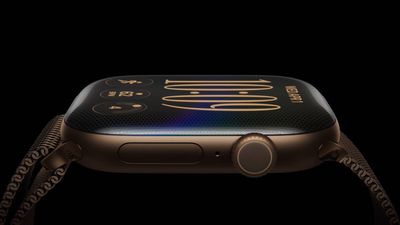
The Apple Watch Series 12 pairs a smaller display with a wider case than Series 10 and Series 11, even though the pixel resolution hasn't changed, according to Apple's own tech specs.
For the 46mm Series 12, Apple's tech specs page lists the display area at 1,196 sq mm, down 2% from 1,220 sq mm on Series 10 and Series 11. The 42mm size shows a similar 1.9% drop, from 989 sq mm to 970 sq mm. Pixel counts are identical across all three generations: 416 by 496 at 46mm, and 374 by 446 at 42mm.
The case grows as the screen shrinks. Apple's Series 12 tech specs list the 46mm case at 46mm by 40mm by 9.7mm, a millimeter wider than the 46mm by 39mm by 9.7mm case on Series 10 and Series 11, a roughly 2.6% increase in case footprint. The 42mm case grew from 42mm by 36mm to 42mm by 37mm over the same span, about 2.8%, with depth unchanged at 9.7mm for both sizes.
A smaller display combined with a bigger casing means bigger borders around the display, and it looks like Apple has also tweaked the design of the Series 12 to recede the casing and expand the front glass, which makes the borders look even larger.
There's recent precedent for a change like this translating into a visibly thicker bezel. Series 10 went through a similar shift when it replaced Series 9 in 2024, growing the case around the display. The Series 10's visible aluminum edge had actually shrunk by around 33% versus Series 9, while the total bezel, including the black glass border, had grown by about 17%, even though the case and display figures looked like an improvement on paper.
It looks like the Series 12 repeats that pattern, although to a less extreme extent. Unlike the Series 9 to Series 10 change, which was a full case redesign, Series 10, Series 11, and Series 12 all share the same approximate case design. The Apple Watch Series 12 starts at $399 and launches on September 18.
If you're wondering why the under-screen camera on the iPhone Duo's inner display isn't placed in the top-right corner, Chinese leaker Instant Digital has provided an explanation.
"The iPhone Duo's under-display camera wasn't placed in the top-right corner of the inner screen because of engineering difficulties," said the leaker in a Weibo post this morning. "The next generation will likely move it there, aligning it perfectly with the outer screen's camera." That sounds like a real engineering challenge, since the opposing rear cameras are the thickest things in the whole phone, but let's wait and see.
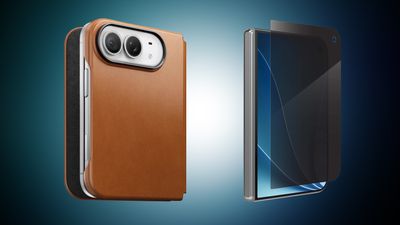
It's iPhone pre-order week, which means anyone looking to get the new iPhone 18 Pro or iPhone 18 Pro Max will likely be looking for new cases and protection for the smartphones. Below we're tracking all of the best case and screen protector options from the most popular accessory brands, including ZAGG, Nomad, and more.
Note: MacRumors is an affiliate partner with some of these vendors. When you click a link and make a purchase, we may receive a small payment, which helps us keep the site running.
Most of these retailers aren't offering discounts on these new case accessories, but at ZAGG you can get 20 percent off your order when you purchase any two accessories. This is a perfect opportunity to save some money with a new case and screen protector for your new iPhone.
ZAGG - iPhone 18 Pro and iPhone Duo cases and screen protectors (20% off two items)
There are some iPhone Duo case and screen protector options available from these retailers as well, but shoppers should remember the Duo itself won't launch until later in October. If you're on the hunt for more discounts, be sure to visit our Apple Deals roundup where we recap the best Apple-related bargains of the past week.
Deals Newsletter
Interested in hearing more about the best deals you can find in 2026? Sign up for our Deals Newsletter and we'll keep you updated so you don't miss the biggest deals of the season!
Hidden beneath the 7.6-inch inner screen of the foldable iPhone Duo is an under-display FaceTime camera. The long-rumored feature is a first for Apple, yet the company hasn't provided as much detail about it as the device's other cameras.
For example, unlike the 12-megapixel sensor on the outer front display and the two 48-megapixel lenses on the back, Apple has not revealed the megapixel count of the under-screen camera. Apple's tech specs page for the iPhone Duo offers the following details about its capabilities:
Under-display FaceTime camera
Center Stage for video calls
ƒ/1.8 aperture
Tap to zoom and rotate
Ultra‑stabilized video
1080p video recording at 30 or 60 fps
Animoji and Memoji in FaceTime
Wide color capture for photos and Live Photos
Lens correction
Auto image stabilization
QuickTake video at 1080p at 30 fps and 60 fps
Spatial Audio and stereo recording
Wind noise reduction
Audio Mix
Apple says the under-display camera records video at up to 1080p at 60 frames per second, compared to 4K at up to 60 fps for the outer front camera and 4K at up to 120 fps for the Main rear camera. This means the sensor is at least 2 megapixels – the minimum necessary to shoot 1080p video. However, its apparent inability to shoot 4K video may suggest it is less than 8 megapixels. Given that Apple has kept quiet, perhaps it's closer to 2 megapixels.
The under-screen camera's f/1.8 aperture is faster than the outer camera's f/2.2 aperture, which makes sense since it is probably helping to compensate for light lost through the display. Of course, Apple has not detailed the resulting trade-offs in image quality. How it affects photos and video is only likely to become clear once we get more time with the device.
According to a December 2023 report, LG Innotek was developing an under-display camera for Apple using a "freeform optic" lens array designed to reduce distortion and compensate for brightness loss. Again though, we don't know if this is the camera that made it into the iPhone Duo.
Another thing to note is that the display layer over the camera appears to lack the anti-reflective nano-texture coating found on the rest of the screen, resulting in a glossy dot. The screen also likely covers the lens with a lower density patch of pixels.
Regardless, the difference means the camera's location is less discreet than one might expect depending on the angle of ambient light. Apple even subtly acknowledges this in its marketing materials with a circular shadow on the screen, but going on the video below and the variable reflectivity, the effect can be more pronounced than the company is letting on.
Samsung has grappled with the same issue. The Korean company previously used under-display cameras in models including the Galaxy Z Fold6, before switching to a conventional 10-megapixel punch-hole camera with the Galaxy Z Fold7. This is Apple's first attempt at under-screen camera technology, so future iterations of the Duo may be better at hiding what can appear like a small smudge or blemish in the display – depending how you look at it.
Apple says preorders for the iPhone Duo will go live at 5:00 a.m. Pacific Time on Friday, October 16, with availability beginning Friday, October 23.
Apple yesterday announced the Apple Watch Series 12, Apple Watch Ultra 4, and AirPods 5 at its "Surprise and Shine" event, and today all of these devices are up for pre-order on Amazon. This also includes the first cash discount on the Apple Watch Series 12.
Note: MacRumors is an affiliate partner with Amazon. When you click a link and make a purchase, we may receive a small payment, which helps us keep the site running.
AirPods 5
You can pre-order the AirPods 5 and AirPods 5 with Wireless Charging Case right now on Amazon, available for $129.00 and $149.00, respectively. There are no pre-order deals yet on these devices, and they will officially launch on September 18.
If you're looking to save some money, and don't need Active Noise Cancellation, Amazon currently has the previous generation AirPods 4 for $99.00, down from $129.00. There's also a solid deal on the AirPods Max 2 for $449.00, down from $549.00.
Apple Watch Series 12
Apple Watch Series 12 models are also up for pre-order on Amazon today, starting at $399.00 for 42mm GPS devices and $449.00 for 46mm GPS devices. These will also launch on September 18 alongside the new AirPods 5.
If you're interested in the cellular models of the Apple Watch Series 12, you have a chance to get the first savings on these devices via Amazon. The 42mm Cellular Series 12 is available for pre-order at $489.99, down from $499.00, which isn't a large markdown but it is the only deal you'll find on these brand-new watches online right now.
You can also pre-order the new Titanium Apple Watch Series 12 models starting at $699.00, and the Ceramic model is available for $949.00.
Apple Watch Ultra 4
The Apple Watch Ultra 4 is available for pre-order on Amazon for $799.00 in Black and Natural Titanium color options. This device will launch on September 18, alongside the Series 12 and AirPods 5.
For a full breakdown of everything Apple announced this week, be sure to visit our dedicated post with all of the biggest pieces of news from the event.
If you're on the hunt for more discounts, be sure to visit our Apple Deals roundup where we recap the best Apple-related bargains of the past week.
Deals Newsletter
Interested in hearing more about the best deals you can find in 2026? Sign up for our Deals Newsletter and we'll keep you updated so you don't miss the biggest deals of the season!
Apple's tech specs suggest the iPhone Duo's Main camera sensor is seemingly a match for the iPhone 17e's, not the standard iPhone 17's.
According to Apple's tech specs page for the iPhone Duo, the Main camera is a 26mm, ƒ/1.6 sensor with sensor-shift optical image stabilization and Hybrid Focus Pixels, also enabling a 12MP 2x Telephoto crop from the same sensor. The iPhone 17e's tech specs page lists an identical 26mm, ƒ/1.6 Main camera with Hybrid Focus Pixels, the same autofocus terminology Apple uses for the iPhone Duo.
The match is not total, though. The iPhone 17e's tech specs describes plain "optical image stabilization" with no "sensor-shift" qualifier, while the iPhone Duo's does include it. That detail instead lines up with the standard iPhone 17's tech specs page, which pairs sensor-shift OIS with a different autofocus term, "100% Focus Pixels," the wording iPhone 18 Pro's tech specs page also uses but Duo and 17e do not.
This suggests that the Main camera of the iPhone Duo realistically falls somewhere between the iPhone 17e and iPhone 17, possessing the sensor-shift optical image stabilization of the iPhone 17, but with an iPhone 17e-style sensor that uses Hybrid Focus Pixels.
The overlapping Focus Pixels wording with the 17e is fueling speculation online that the two devices share a sensor. Apple has not published a sensor size or pixel pitch for the iPhone Duo's Main camera, leaving the matching Focus Pixels wording as the only official link to the 17e for now.
The iPhone Duo starts at $1,999, with pre-orders opening October 16 ahead of an October 23 release.
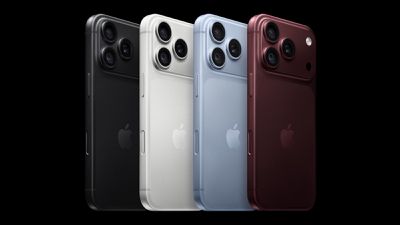
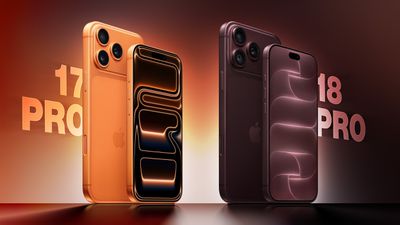
Apple yesterday announced the iPhone 18 Pro and iPhone 18 Pro Max, succeeding the iPhone 17 Pro that launched last September. The new models are built around the A20 Pro chip, a 48-megapixel Fusion Main camera with variable aperture, a redesigned vapor chamber, and a smaller Dynamic Island.
Last year's iPhone 17 Pro brought one of the biggest design changes to the lineup in years, switching from a titanium frame and glass back to an aluminum unibody with Ceramic Shield 2. With that overhaul out of the way, this year's update is more about what's inside the phone than a new look, focused on the chip, camera, and battery rather than another redesign. The iPhone 18 Pro Max, which shares nearly all of these changes, also gets a battery capacity increase of its own, delivering the largest jump in battery life in the iPhone's history.
The iPhone 18 Pro starts at $1,199 for 256GB, up from the iPhone 17 Pro's $1,099 starting price. Our guide breaks down every difference between the two generations to help you decide whether the upgrade is worth it. Here's everything that differs between the iPhone 17 Pro and iPhone 18 Pro:
Built with TSMC's N2 process (2nm), Apple's first 2nm smartphone chip
6-core CPU with 2 performance cores and 4 efficiency cores
6-core CPU with 2 super cores and 4 efficiency cores
50% more memory bandwidth than A19 Pro
6-core GPU with Neural Accelerators
7-core GPU with Neural Accelerators, up to 40% faster than A19 Pro
16-core Neural Engine
Dual 16-core Neural Engine (32 total cores)
Vapor chamber cooling
Next-generation vapor chamber with 3x more surface area than iPhone 17 Pro's, up to 40% higher sustained performance
New chip packaging that places silicon die beside memory, allowing it to attach directly to the vapor chamber
Qualcomm X80 modem
Apple C2 modem
Rear Camera
iPhone 17 Pro (2025)
iPhone 18 Pro (2026)
Fixed ƒ/1.78 aperture on the 48-megapixel Fusion Main camera
Variable-aperture 48-megapixel Fusion Main camera with four stops: ƒ/1.48, ƒ/1.8, ƒ/2.8, and ƒ/4.0, using six laser-cut blades
API available for developers to control the aperture range within their own apps
Faster Night mode, tied to the new variable-aperture lens
Pro controls in the Camera app: manual lens aperture, shutter speed, white balance, and histogram
New sensor and computational imaging pipeline on the Fusion Main camera, delivering around 50% better low-light performance and more detail in the back of group photos
Photographic Styles 2, adjusting tone and color
Photographic Styles 3, adding texture and grain controls alongside tone and color
Smart focus tracking
Cinematic mode recording up to 4K Dolby Vision at 30 fps
Cinematic mode recording up to 4K Dolby Vision at 60 fps
Cinematic mode effects can be applied after capture, on video shot at up to 60 fps
Improved low-light video
Time-lapse video recording with stabilization, up to 4K Dolby Vision
Apple Reference Image (Fusion Main only), an opt-in feature that signs sensor data so a photo's authenticity can later be verified
Audio Mix
Audio Mix with new algorithms for higher-quality voices, and the ability to isolate music
Front Camera
iPhone 17 Pro (2025)
iPhone 18 Pro (2026)
Photographic Styles 2, adjusting tone and color
Photographic Styles 3, adding texture and grain controls alongside tone and color
Smart focus tracking
Cinematic mode effects can be applied after capture
Improved low-light video
Time-lapse video recording with stabilization, up to 4K Dolby Vision
Discontinued and no longer sold directly by Apple, now only available via third-parties
iPhone 18 Pro: Sold directly by Apple, from $49.95 a month for 24 months via Apple Upgrade iPhone 18 Pro Max: Sold directly by Apple, from $54.12 a month for 24 months via Apple Upgrade
Apple's redesigned vapor chamber and the A20 Pro's move to TSMC's 2nm process are among the most important updates under the hood this year, and together they raise sustained performance and unlock longer battery life. Battery life rises from 33 hours on the iPhone 17 Pro to 36 hours, and from 39 to 45 hours on the Pro Max, which is the largest battery gain Apple has delivered on an iPhone. Charging is faster too, reaching 50% in around 15 minutes with a 60W-capable adapter, down from 20 minutes last year.
The Dynamic Island sees the most visible external change, shrinking in size while expanding from two simultaneous Live Activities to three, letting users track a flight, a Maps route, and a timer at once without switching apps.
The most significant leap is the Main camera. It trades its fixed ƒ/1.78 aperture on the iPhone 17 Pro for a four-stop variable aperture ranging from ƒ/1.48 to ƒ/4.0, delivering around 50% better low-light performance and giving photographers optical control over depth of field that the iPhone has never offered before. Paired with new Pro controls for manual aperture, shutter speed, and white balance, Photographic Styles 3's added texture and grain sliders, and Apple Reference Image for verifying a photo's authenticity, the camera system does more to justify the Pro name than anything else in this update.
The iPhone 18 Pro is clearly aimed at photographers and creators, but the longer battery life, faster charging, and more capable Dynamic Island give casual users real reasons to notice the difference too. Compared with last year's aluminum unibody overhaul, this is a more targeted upgrade rather than a wholesale reinvention, but between the chip, the camera, and the battery gains.
For existing iPhone 17 Pro or iPhone 17 Pro Max owners, there is no general-purpose reason to upgrade to either new model. The core design, display sizes, and everyday camera experience carry over largely unchanged, and both new models cost $100 more than their iPhone 17 Pro equivalent. The upgrade is worth it if you specifically want variable aperture and manual Pro controls for photography, or if you rely on sustained performance for gaming or on-device AI tasks where the A20 Pro's cooling and Neural Engine gains will be most noticeable, but realistically this will only encompass a minority of users.
For new buyers coming from an iPhone 16 Pro or older, the iPhone 18 Pro is the better long-term purchase given the newer chip and camera system. That being said, if you can get an iPhone 17 Pro at a substantially lower price, it is probably worth buying last year's model instead.
Pre-orders for the iPhone 18 Pro and iPhone 18 Pro Max open Saturday, September 12, with availability beginning Friday, September 18.
MacRumors has confirmed that the Apple Watch Series 12 and Apple Watch Ultra 4 have increased RAM compared to the previous-generation models.
Both new models are equipped with 4GB of RAM, according to Apple's developer tool Xcode 27.
Apple Watch Series 11 and Apple Watch Ultra 3 models are equipped with 2GB of RAM, so the Series 12 and Ultra 4 have twice as much memory.
Apple Watch Series 12 and Apple Watch Ultra 4 models are equipped with a new S11 chip that powers new Apple Intelligence features when the watches are paired to an iPhone 15 Pro or newer. The increased RAM will help to enable these new functions, such as Live Rewind text snippets and Siri Recap summaries, and give a boost to Siri AI.
Despite a severe memory chip shortage that has driven up the price of RAM and resulted in Apple raising prices on iPhones, iPads, Macs, and more in recent months, the Series 12 and Ultra 4 start at $399 and $799 respectively in the U.S., meaning the devices have the same starting prices as the Series 11 and Ultra 3 even with more RAM.
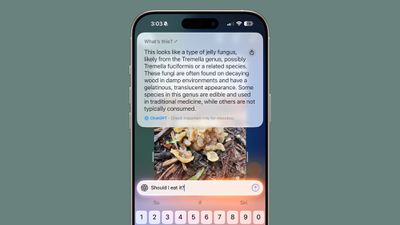
Apple may be exploring a way to let search providers show sponsored results inside Visual Intelligence, according to code uncovered in iOS 27.
The find comes from MacRumors' Aaron Perris, who said in a post on X that the code points to Apple allowing search providers to insert their own sponsored results into Visual Intelligence, rather than Apple selling the ad space itself. He compared it to the sponsored product listings already seen on Amazon and Google. It is not clear whether Apple would take a cut of ad revenue.
The feature would let third party search providers, such as Google, insert items such as sponsored product images alongside the organic results Visual Intelligence already returns when a user points their camera at an item to shop for it. That would set it apart from the advertising pushes Apple has driven directly in its own apps over the past year.
Apple has been steadily expanding its advertising business across the App Store and Maps. The company began showing additional sponsored slots in App Store search results in March, and ads went live in Apple Maps in the United States and Canada last month.
Visual Intelligence already routes shopping queries to services like Google Image Search and retailers such as Etsy, Amazon, and Anthropologie, so ad supported results from those partners would build on functionality that already exists in iOS 27.
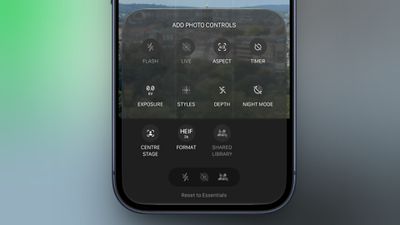
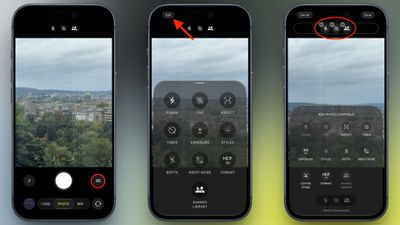
In the iOS 27 Release Candidate that Apple released to developers on Wednesday, Apple added the long-rumored ability to customize the Camera app's controls. Way back in May, Bloomberg's Mark Gurman reported that Apple planned to make the Camera app more customizable, but it's only now that the feature has made it into the beta roadmap.
To customize the Camera app's controls, tap the button with six circles inside in the bottom-right of the Camera's UI and look for a new Edit button in the top-left corner.
From the new "Add Photo Controls" tray that appears, you can add or remove the widget-like controls to the top of the Camera app's UI, then press Done in the top right when you're happy with your selection. Depending on your iPhone model, you can choose from the following controls:
Flash
Live Photo
Aspect Ratio
Timer
Exposure
Styles
Filters
Depth Control
Night Mode
Center Stage
File Format
Shared Library
A "Rest to Essentials" option at the bottom of the widget tray lets you revert to the default set of controls.
When the customization feature didn't appear in Apple's iOS 27 preview at WWDC in June, Gurman said he believed that Apple was holding it back specifically for the release of new iPhone 18 Pro models, which bring some of the most significant camera hardware upgrades in several years.
While the iPhone 18 Pro and Pro Max have now been unveiled, it appears that Apple is making the customization feature available to all iPhone models capable of running iOS 27. Apple is set to officially release iOS 27 to the public on Monday, September 14.
Apple has detailed how iOS 27 was rebuilt to adapt in real time to the iPhone Duo, the company's first foldable iPhone, reshaping the interface as the device folds, unfolds, and switches between its two displays.
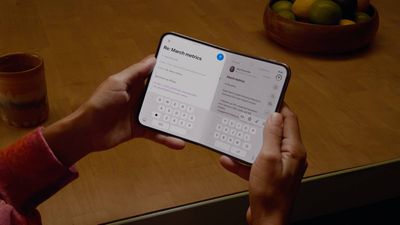
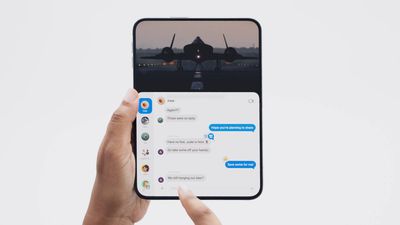
Lock Screen controls, the Dock, and app navigation elements now sit along the side of the display instead of across the bottom, freeing up vertical space for content. When open, the iPhone Duo shows two Home Screen pages. The status bar is now a circular, flexible system that fits into the corner of the screen, and the Dynamic Island runs vertically along the side of the outer display.
The interface also changes based on the device's angle. It reorients when the phone is turned on its side and switches to the appropriate display when flipped over. Apple said building this required changing how individual apps lay out content as the screen changes shape, including moving the Dock to a vertical orientation. Controls stay anchored to the side of the screen throughout, and the Lock Screen moves its buttons aside to give more room for the wallpaper.
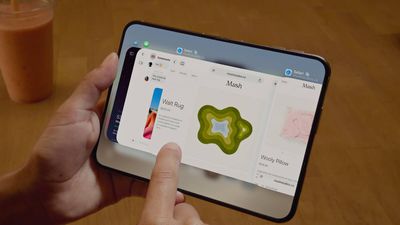
The iPhone Duo supports side-by-side multitasking, which is a first for the iPhone. Split View lets users run two apps at once, and it's possible to open two windows of the same app, such as Safari, or use Siri AI on one side of the screen while viewing content on the other. Users can swipe up from the bottom to switch apps or save a pair of apps to return to later.
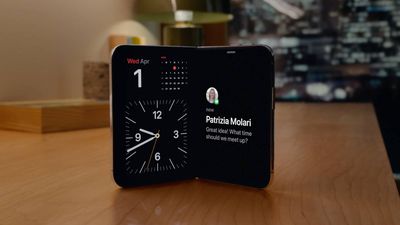
The software also adjusts to how the phone is angled rather than just whether it's open or closed. Content shifts away from the crease when the device is partially folded, where taps are harder to register, and audio tuning algorithms account for the changing distance between the speakers as the phone moves through different positions. When laid flat on a table, iOS uses sensors in each half of the device to let users view content without a stand.
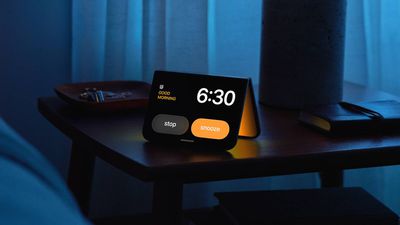
Setting the iPhone Duo down triggers StandBy on whichever display faces up, even when the phone isn't charging, turning it into a photo frame, widget hub, or clock. New Calendar and Weather faces join the existing Clock and Modular options, the Photos face now shows Shared Albums, and each face supports additional colors, fonts, and complications.
Apple has built new APIs for developers to adapt their apps to the dual-display design, and the iPhone Duo support is coming to Device Hub in Xcode. Netflix, Zoom, and Slack have already updated their apps to make use of the larger inner display.
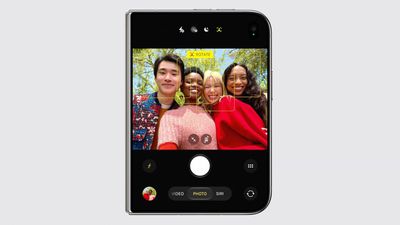
The folding design also enables four camera features not available on other iPhone models. Smart Take uses on-device AI running on the A20 Pro's Neural Engine to analyze a scene and automatically capture a photo when its subjects are posing.
Duo Preview shows a live camera preview on the outer display so a subject can check their framing before taking a shot. Kid Cue plays Peanuts animations on the outer display to get a child's attention. Duo FaceTime lets people standing near the person on a call join in through the outer display.
There are a host of other features such as video playback controls and a keyboard that appear on the lower half of the display when set flat, a split keyboard when the display is partly folded, and more.
Pre-orders for iPhone Duo open at 5 a.m. Pacific on Friday, October 16, with availability beginning Friday, October 23.
Early benchmarkresults for the A20 Pro chip in the iPhone 18 Pro and iPhone 18 Pro Max appeared early this morning in the Geekbench 7 database, offering us a first look at the new models' CPU and graphics performance ahead of the devices reaching customers.
Based on these early results – which are unconfirmed – the A20 Pro chip across the Pro models appears to deliver around 21% to 23% faster performance in single-core and 27% to 28% faster performance in multi-core than the A19 Pro chip in the iPhone 17 Pro. It's a pretty impressive jump.
The iPhone 18 Pro result lists a single-core score of 4,719 and a multi-core score of 12,677, while an iPhone 18 Pro Max entry delivers similar results, scoring 4,725 and 12,575, respectively. Both identify a six-core CPU running at approximately 4.93 GHz.
There are similarly formidable gains on the graphics side for the A20 Pro. Based on early Metalscores in the Geekbench 6 database (also unconfirmed) the full 7-core GPU variant of the chip in the iPhone 18 Pro models is around 38% to 40% faster than the A19 Pro's 6-core GPU.
The graphics results broadly match Apple's claim in its iPhone 18 Pro press release and product page that the A20 Pro offers up to 20% faster CPU performance compared to the A19 Pro chip in the iPhone 17 Pro models, while the A20 Pro's new seven-core GPU is up to 40% faster than the A19 Pro.
Built using a 2-nanometer process, the chip also features a six-core CPU with integrated Neural Accelerators and 50% more memory bandwidth than its predecessor. Apple also says the new chip packaging and redesigned vapor chamber enable up to 40% better sustained performance than the previous generation.
Note that these one-off benchmarks, which have yet to be independently verified, don't tell us how the devices will perform during prolonged gaming or other demanding workloads – benchmark results and real-world performance are never totally analogous.
Apple has updated the design of the virtual Apple TV Remote for the iOS 27 Release Candidate, which was released yesterday, and there are two new features that have been added to the iPhone app's interface.
First up, Apple has added a new button to the top-right corner of the Remote UI with a glyph showing four squares. Pressing the button pops out an app menu similar to the Apple TV home screen that allows you to quickly select an app and launch it.
Second, you can now drag down from the top of the virtual trackpad with your finger to reveal the Apple TV's top shelf carousel, where shows in your watch list are displayed, along with shows that you've started so that you can continue watching.
The two new features, hidden behind feature flags, were discovered by MacRumors and later demonstrated on X (Twitter) by code sleuth "pdfu."
Apple TV Remote is about to get a lot more useful.
iOS 27 RC introduces a refreshed design and two new features, both currently hidden behind feature flags: 1. An app launcher to open apps on your Apple TV. 2. Top Shelf content from the selected app on your Apple TV, with... pic.twitter.com/aOFoToCnrR
— pdfu (@itspdfu) September 9, 2026
The next-generation Apple TV 4K will ship with an upgraded Siri Remote, according to previously discovered macOS 26.7 code findings. We don't know what those upgrades will be, but these two new Remote app features could hint at what's to come. The new Apple TV 4K is likely to be unveiled later this month or in October.
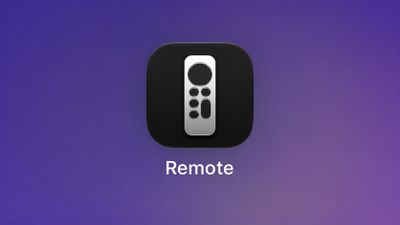
Starting in iOS 27, the virtual Apple TV remote can also be added to the iPhone's Home Screen again, so it's no longer limited to Control Center. If you're on the iOS 27 beta, you can find it by swiping down on the Home Screen and searching for "remote."
Apple's new iPhone Duo lacks Face ID. That may irk users who are used to the seamless unlocking experience that a facial biometric system provides, but fortunately Apple has brought over one of the Mac's best authentication features to its foldable iPhone to make up for it.
Touch ID is integrated into the Duo's side button for authentication whether iPhone Duo is open or closed, but like regular iPhones, if you own an Apple Watch, you can opt to have it unlock your iPhone Duo without you having to press a thing. Pre-orders for iPhone Duo begin at 5:00 a.m. Pacific Time on Friday, October 16, with availability beginning Friday, October 23.
Apple this week announced that macOS 27, also known as macOS Golden Gate, will be released to all users with a compatible Mac on Monday, September 14.
iOS 27, iPadOS 27, watchOS 27, tvOS 27, and visionOS 27 will be released on the same day.
macOS Golden Gate features Siri AI, design improvements, performance enhancements, and more. A developer beta has been available since June, while a public beta followed in July, and now the update will be widely released on September 14.
macOS Golden Gate is compatible with all Macs with an M1 chip or newer:
MacBook Neo (2026)
MacBook Air with Apple silicon (2020 and later)
MacBook Pro with Apple silicon (2020 and later)
iMac (2021 and later)
Mac mini (2020 and later)
Mac Studio (2022 and later)
Mac Pro (2023 and later)
macOS 26 aka macOS Tahoe is the final macOS release compatible with Intel-based Macs.
Intel Macs that can run macOS Tahoe, but not macOS Golden Gate:
13-inch MacBook Pro (2020, Four Thunderbolt 3 Ports)
16-inch MacBook Pro (2019)
27-inch iMac (2020)
Mac Pro (2019)
Apple said Intel-based Macs will continue to receive security updates for three years.
macOS 27 Golden Gate can still run Intel apps on Apple silicon, as it is the final major macOS release to include Apple's full Rosetta translation layer.
Apple's first foldable iPhone, with a book-style design featuring a 5.4-inch outer display and a 7.6-inch inner display with a minimal crease down the middle.


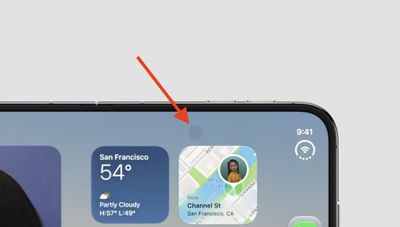 If you're wondering why the under-screen camera on the iPhone Duo's inner display isn't placed in the top-right corner, Chinese leaker Instant Digital has provided an explanation.
 Note: MacRumors is an affiliate partner with some of these vendors. When you click a link and make a purchase, we may receive a small payment, which helps us keep the site running.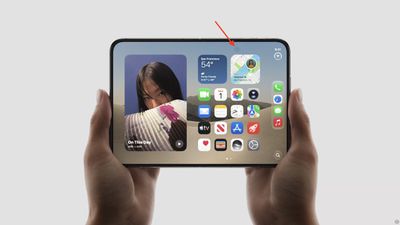
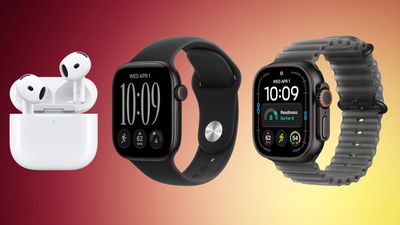 Note: MacRumors is an affiliate partner with Amazon. When you click a link and make a purchase, we may receive a small payment, which helps us keep the site running.



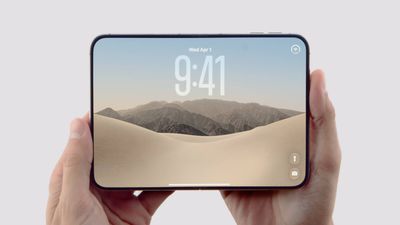 Apple's new iPhone Duo lacks Face ID. That may irk users who are used to the seamless unlocking experience that a facial biometric system provides, but fortunately Apple has brought over one of the Mac's best authentication features to its foldable iPhone to make up for it.